
North Loop Green
A headless WordPress + React build for one of Minneapolis' biggest mixed-use developments. Themeable component system, custom event calendar, ACF-backed content model, and WCAG 2.2 compliance baked in.
The brief
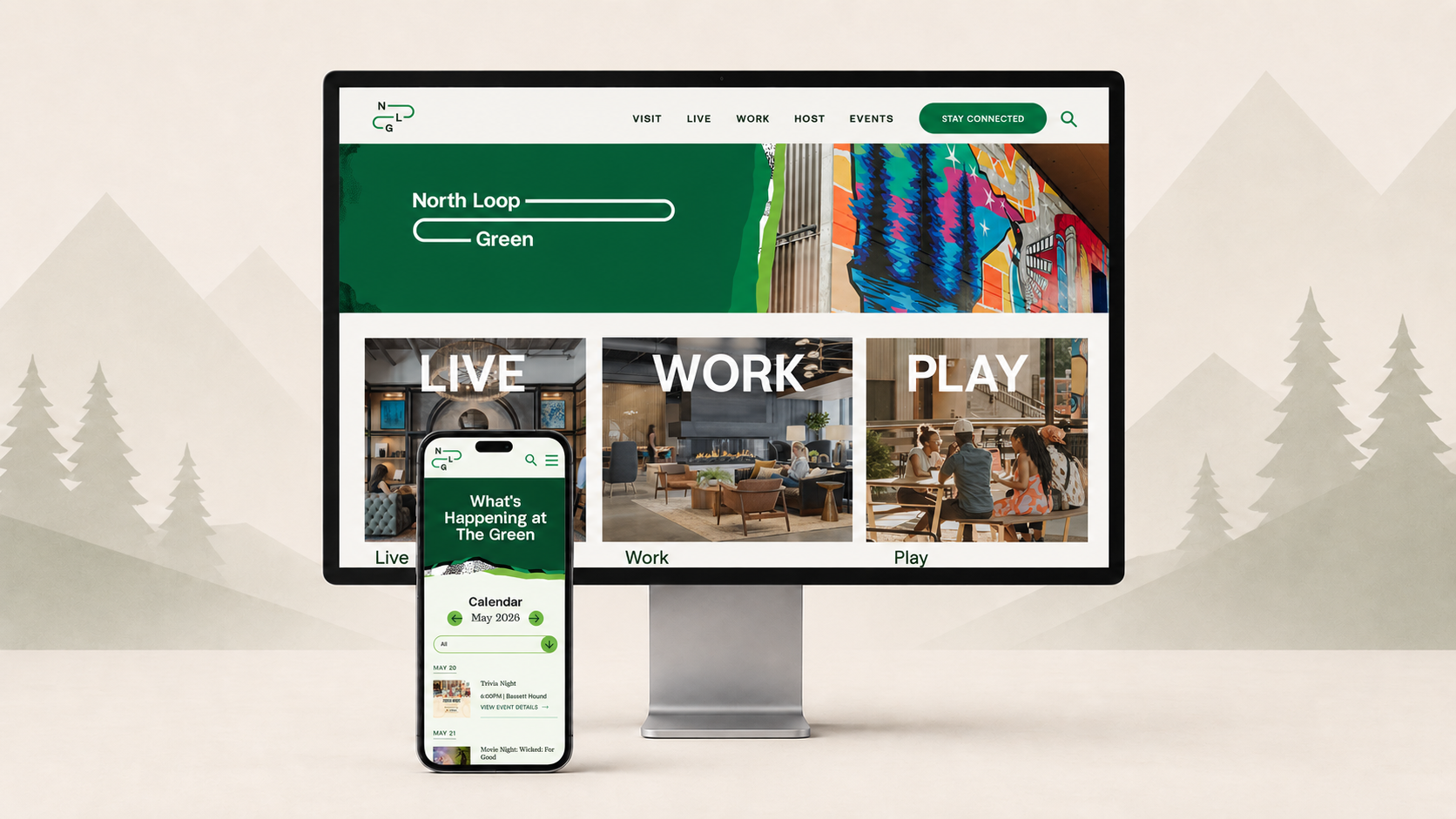
North Loop Green is a new mixed-use development in Minneapolis sitting directly across from Target Field. The complex includes residential units, office space, multiple food and beverage tenants, and a central green space — The Green — that hosts public events nearly every day of the year. Marquee Development (the operator behind the project, with connections to the Chicago Cubs and Gallagher Way) needed a website that could anchor all of it: a place to live, a place to work, a place to visit, and a place to find out what was happening on any given Saturday.
I came on through Indee, a Minneapolis brand and design studio I've collaborated with for years. The brand identity was already in place — the looping NLG logotype, the cream-and-forest palette, the textured illustrated banners that read like torn paper. My job was to turn that brand into a working, editable, accessible website that Marquee could run themselves.
How we landed on headless WordPress
Marquee came in with a clear technical preference: they wanted a stack similar to Gallagher Way's — Contentful CMS, React frontend, AWS Elastic Beanstalk + Node hosting, GitHub for code. Their IT team builds and operates that pattern for the Cubs' sites already and they wanted the new one to slot in.
We talked through tradeoffs. I'm a WordPress generalist by trade and proposed a headless WordPress alternative: same React frontend, same AWS deploy target, but WP + ACF as the editorial layer instead of Contentful. The pitch was simple — Marquee's team wouldn't need to learn a new CMS, the content modeling was more flexible at the price point, and Gutenberg gave their editors visual preview without coupling content to the front-end build.
They went for it. Final stack: headless WordPress + React + GraphQL, deployed on Cloudways.
The team
Two of us, plus the Indee partnership:
- A UX designer — UX, SEO, sitemap, hi-fi wireframes, design execution
- Me — engineering, architecture, accessibility, deployment
She produced the IA and the design system in lockstep with the existing NLG brand work. I built every component, post type, query, and integration. Two-person team, tight feedback loops, no agency overhead.
The build
Component library (14–18 reusable blocks)
The whole site is a composition of about sixteen reusable components — hero banners, event cards, the FAQ accordion, the map block, the calendar, the partner strip, the textured section dividers, and so on. Each one is registered as a Gutenberg block on the WordPress side (so editors can preview real layouts in the admin) and renders to a React component on the frontend that pulls its data via GraphQL.
// Excerpt: registering a themeable block on the WP side
acf_register_block_type([
  'name'            => 'nlg/event-card',
  'title'           => 'Event Card',
  'category'        => 'nlg',
  'mode'            => 'preview',
  'supports'        => [ 'jsx' => true, 'align' => false ],
  'render_template' => 'template-parts/blocks/event-card.php',
]);
Theme switching ("Winterland" pattern)
One of the requirements borrowed from Gallagher Way was the ability to switch the entire site into a campaign or seasonal aesthetic — for them it's Winterland during the holidays. We built the same capability into NLG from day one.
Every component reads its color tokens, illustration assets, and section dividers from a global ACF options page. Flip the active theme in the admin, save, and the next deploy pushes the entire site into the new look. Components can also override at the block level for one-off campaign moments. No code change required from Marquee to run a holiday or summer campaign — they just toggle the theme.
Content model + post types
Different content shapes got their own post types so the admin stays clean and the API stays predictable:
event— calendar entries with category, time, image, locationamenity— features of the complex (dog run, office space, retail tenants)faq— grouped Q&Apartner— sponsor / partner brand listingstenant— food and beverage spots inside the complexpage— standard content pages
Each one is exposed through WPGraphQL with custom ACF field groups attached, so the React frontend gets typed, rich data per query.
How the front-end talks to WordPress
WPGraphQL turns the WordPress data layer into a typed GraphQL schema. Custom post types and ACF field groups get auto-registered as queryable types — flip a show_in_graphql flag on the post-type registration and a new node type appears in the schema without writing a single resolver. ACF field groups attach themselves the same way through WPGraphQL for ACF.
The result is that the React app fetches exactly what each component needs, nothing more. The calendar fires one query for the visible month and gets back a tidy, typed payload:
query EventsForMonth($from: String!, $to: String!) {
  events(
    first: 100,
    where: { eventDateRange: { from: $from, to: $to } }
  ) {
    nodes {
      id
      slug
      title
      eventDetails {
        startTime
        endTime
        location
        category
        coverImage {
          node {
            sourceUrl(size: LARGE)
            altText
          }
        }
      }
    }
  }
}
eventDetails is an ACF group on the event post type. The frontend doesn't know or care that ACF is involved — it just gets typed event data. The TypeScript types for the response are codegen'd from the schema at build time, so the IDE knows what every field is before the request ever fires.
The win here isn't "we use GraphQL" — it's that the editor and the engineer get to talk through the same schema. When the editor adds a new ACF field, it shows up in the schema, the frontend types regenerate, and the new field is available to the React component on the next reload. No REST endpoint to hand-roll, no payload to bikeshed.
Custom event calendar
The Events surface — both list view and full month grid view — is the heaviest piece of the site. It pulls from the event post type, filters by category (Games + Sports, Movies, Fitness, Arts + Culture, Food + Drink), and each event has a detail page with rich meta, partner attribution, and ICS export. All of it is driven by the same GraphQL backend the rest of the site uses, so the calendar is just another consumer of the schema — not a separate system.
Forms + SendGrid (the fun part)
Gravity Forms handles the UI side — validation, conditional logic, multi-step where needed, the editor-friendly form builder Marquee actually wanted. The interesting part is what happens after submit.
Gravity Forms exposes a per-form action hook: gform_after_submission_{form_id}. It fires once a submission is saved, hands you the $entry (the submitted values) and the $form (the form definition), and steps out of the way. From there you can do anything — fire webhooks, hit external APIs, route to different inboxes, all without leaving WordPress.
We use it to route data to SendGrid in two different shapes:
- Newsletter opt-in → push the contact into a SendGrid Marketing list (
PUT /v3/marketing/contacts) - Inquiry / contact → send a transactional email via SendGrid Mail Send to the right Marquee inbox
// Newsletter signup (form #3) — opt-in checkbox in field #7
add_action('gform_after_submission_3', function ($entry, $form) {
    if (rgar($entry, '7') !== '1') return; // user didn't opt in

    wp_remote_request('https://api.sendgrid.com/v3/marketing/contacts', [
        'method'  => 'PUT',
        'headers' => [
            'Authorization' => 'Bearer ' . SENDGRID_API_KEY,
            'Content-Type'  => 'application/json',
        ],
        'body' => wp_json_encode([
            'list_ids' => [ NLG_NEWSLETTER_LIST_ID ],
            'contacts' => [[
                'email'      => rgar($entry, '2'),
                'first_name' => rgar($entry, '3'),
            ]],
        ]),
    ]);
}, 10, 2);
The flow end-to-end: editor builds the form in the Gravity Forms admin → field IDs get mapped in our hook → submissions push to SendGrid → newsletter signups land in the right Marketing list, ready for Marquee's team to send campaigns from. No Zapier in the middle, no third-party plugin glue, no surprise monthly bills. Just WordPress hooks doing what WordPress hooks were made to do.
Accessibility
Accessibility wasn't bolted on at the end. Components were built against the WCAG 2.2 guidelines from the first commit: color-contrast tokens validated at the design-system level, full keyboard navigation on every interactive element, proper ARIA on the calendar, the menu, the accordion, and the form widgets. Screen-reader testing was part of the QA loop, not a checkbox at the end.
I don't claim formal certification — that's what a third-party audit (Allyant or similar) is for, and the system is structured to make that audit cheap rather than painful. The goal here is "built with care," not "legally certified."
Hosting
Deployed on Cloudways. Marquee owns the account; I built and shipped, they run it. Cookie compliance via CookieYes, analytics via a Marquee-managed Google Analytics property.
Outcome
The site launched alongside the complex's grand opening and immediately became the central hub for residents, prospective tenants, office-space inquiries, and visitors checking the events calendar. Marquee's marketing team now self-publishes events, swaps seasonal themes, and updates content without ever needing me — which was the goal from day one.
It's the kind of project where the engineering should be invisible. The client sees a fast, on-brand, easy-to-edit site. They don't need to know about GraphQL fragments, ACF field mappings, or the way the theme tokens cascade. They just need it to work.
It does.
Gallery


